Part 1.2: Crossing the Aisle into the Engineering Side: I'm not going to Phase 2 just yet
Part 1.2: Before moving on to Phase 2
In Part 1 of this post series I said Part 2 onwards in the series will cover the self-hosted VPS build and that is still the intention. But, I never planned to shut down the Google Cloud version of the build. I did achieve for the most part what I wanted to achieve, an end-to-end data pipeline from data ingestion to visualization. The visualization component is where it did not turn out exactly as I wanted it to, and I realize that is in part due to the limitations of Data Studio, Google's free business intelligence and data visualization product. The intention was for this to be a live solution in my portfolio that I can point to, not just screenshots in a blog post. However I did not want to incur more costs than necessary to keep running, because my very initial research said costs should be minimal. This brings me to the other piece I was not completely satisfied with.
My first monthly bill was CAD$110. I did not want to fall into the trap where you get your first cloud bill, panic slightly, and shut everything down. I don't have endless cash at my disposal to spend on "hobby" projects, but based on my research in preparation for the build, I had some sense that this project should not be costing me even $20 per month. Clearly the research wasn't thorough enough, or I think it was just that I did not want to get stuck in a research rut and never get started. So, the desire to keep the GCP version live, as well as wanting to solve for the cost, is what led to Part 1.2.
What I was actually paying for
The original setup used Cloud Run functions for the data extraction function. I did not completely understand the cost I was incurring for the minimum instances and the higher memory limit allocation I had set. I was essentially "trial and erroring" my way through the setup until it worked. After the first bill shock I immediately reduced the memory limit allocation and brought down the costs significantly. And then, after reading more and understanding the services better, it came down to under $15.
I went back into the console to verify exactly what had been costing me, and the autoscaling settings confirmed it: minimum instances was not set, which means it defaults to zero. That default is the whole reason the function scales to zero today and barely costs anything. But it also means that during the earlier "trial and erroring" phase, the higher cost almost certainly came from the minimum instance I had explicitly configured without understanding. Cloud Run functions does not set that for you, you set it yourself, and I did it without fully registering what it meant for the bill.
Finding a solution
After going back to Google Gemini (I figured Gemini would know best since I was running on the Google stack), one of the options was to use Cloud Workflows, which is built exactly for this kind of orchestration problem. It runs when you tell it to, does what you defined, and then it stops. I learned that the free tier for Workflows is a generous 5,000 internal steps per month. For a pipeline that runs quarterly, it barely registers any steps. After prompting Gemini asking how I could leverage the Cloud Run functions I already had instead of trying to have Workflows handle everything, I realized Cloud Run functions actually offers a generous free tier as well. For my project, the free tier is sufficient. The ignorance tax I was paying was thinking I needed a minimum instance of always on CPU, which was costing me more than necessary every day.
Pipeline Optimization: Cloud Run to Workflows
Reconfiguring the pipeline involved rebuilding the orchestration logic in YAML. For transparency, I am not familiar with YAML, so to get the reconfiguration done I relied on Gemini to generate it. I chose to use Workflows to orchestrate the process and leverage the existing Python Cloud Run functions as workers to call the Open Data API, rather than serving as entry points. Using Cloud Workflows also removed another manual touchpoint that existed in my previous setup, which was loading the data into BigQuery. In my previous setup I was manually loading the data into BigQuery, which was annoying. This change streamlined the process by aligning the tools with the actual workload and removing several clicks from the refresh process.
I encountered some bugs during the reconfiguration and build in Workflows. None of them were really dramatic on their own, but each one taught me something about how these services actually behave under the hood. The infographic below summarizes the new build, highlighting the bugs and how each got fixed.
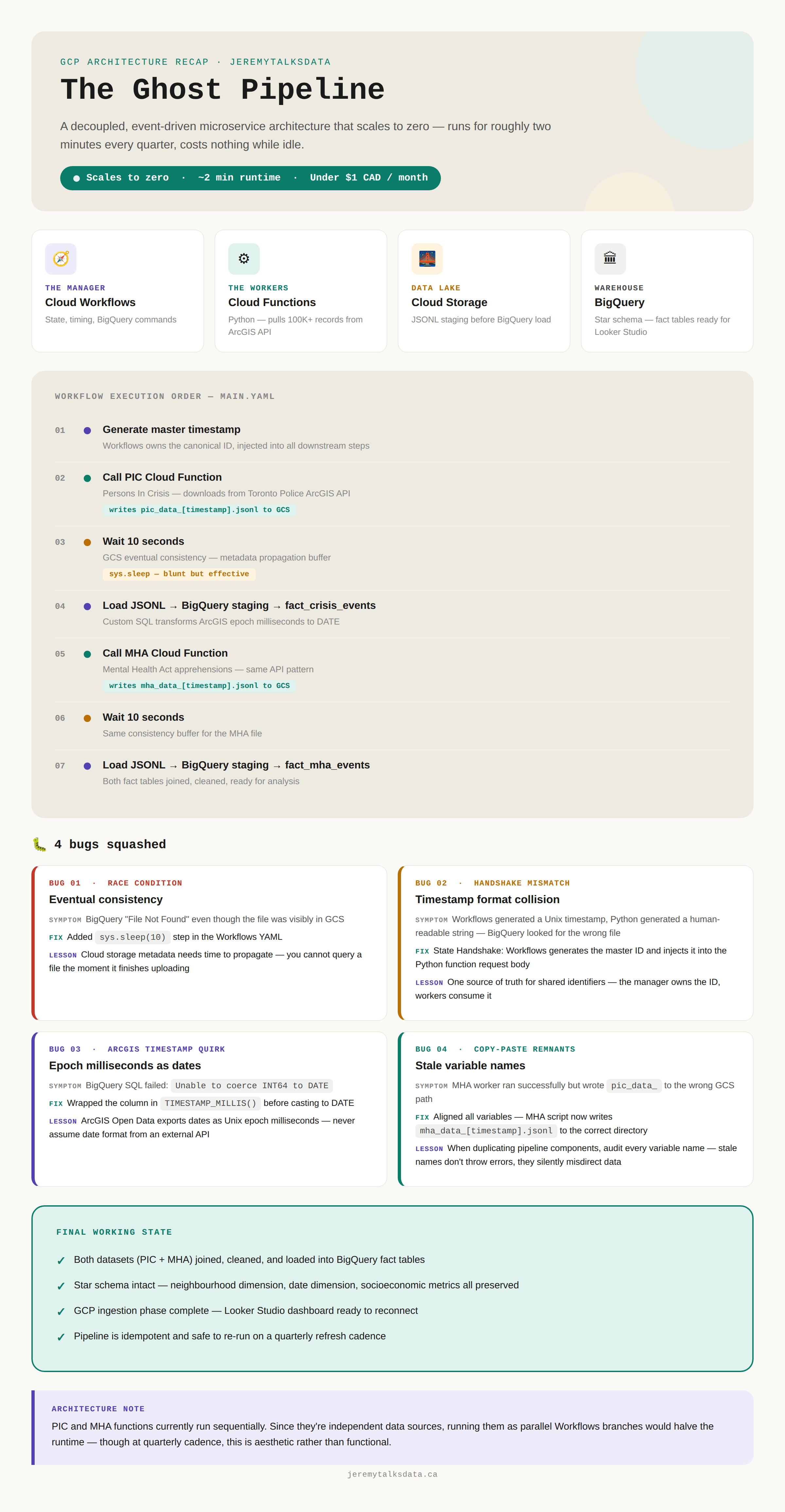
The new pipeline runs in approximately two minutes, consists of seven streamlined steps, and scales to zero, significantly optimizing both cost and efficiency. Combined with the fact that BigQuery's free tier covers far more than this dataset requires, the total cost now lands under a dollar a month. The only real ongoing cost is storage, which for this project rounds to about two cents per gigabyte.
What the pipeline actually looks like now
The new version runs the same logic, just orchestrated differently: Workflows generates a shared timestamp, calls each extractor function in turn, waits for GCS to catch up, then loads and transforms into the matching fact table — once for the Persons in Crisis dataset, once for Mental Health Act apprehensions. Both fact tables sit in the same BigQuery star schema from Part 1. The neighbourhood dimension, the socioeconomic data, the analytical views — all of it unchanged. The only thing that changed is how the data gets there.
Why this matters beyond the cost
The architecture shift from Cloud Run functions to Workflows is a good illustration of a foundational principle: match the tool to the actual workload, not to what sounds impressive.
Cloud Run functions is a great service. Workflows is a great service. The question is always what problem you are actually solving. A constantly-available container for a quarterly batch job is the wrong answer to the right question. An event-driven orchestrator that scales to zero and runs on a schedule is the right answer.
About the bugs
I also want to callout something about the bugs here. None of the bugs I encountered in the rebuild were novel or the sole result of using AI in any way. The eventual consistency delay and the epoch timestamp issue aren't coding mistakes at all; they're facts about the platform and APIs involved. Cloud Storage takes a moment to propagate metadata regardless of who writes the orchestration logic, and ArcGIS exports dates as Unix milliseconds regardless of who writes the SQL. Anyone integrating with these systems hits the same walls.
The timestamp mismatch and the copy-paste remnants are old software engineering problems that predate any of this tooling by decades. What's different with AI in the loop isn't the category of bug, it's the speed. You can generate and duplicate code fast enough that the usual habits of double-checking, the ones that would normally catch a stale variable name or an unstated assumption between two components, have to be deliberately reintroduced as a step, not assumed as a byproduct of how slowly people used to write things by hand. The governance instincts of read before you build, profile before you transform, question the assumptions, apply just as much here.
So what is actually next
The GCP version of this project is now where it should be, under a dollar a month, with minimal manual steps, producing clean data in BigQuery, connected to the Google Data Studio dashboard.
Part 2 will still be the VPS build. PostgreSQL with PostGIS, DuckDB, Streamlit, the full self-hosted stack I described in the original roadmap. But I wanted to close the loop on GCP properly before moving on, because Part 1 left some things unfinished and this is the kind of project where the details matter.
If you want to follow along, the blog index is at blog.jeremytalksdata.ca and I am on LinkedIn at the link below. The dashboard from Part 1 is still live if you want to explore the data. Open it in a private or incognito window if you are logged into a Google account, which is a Google Data Studio quirk I have not found a clean workaround for yet.